文章目录[隐藏]
ROS部署PPTP V P N服务
教程说明
1.创建IP地址池
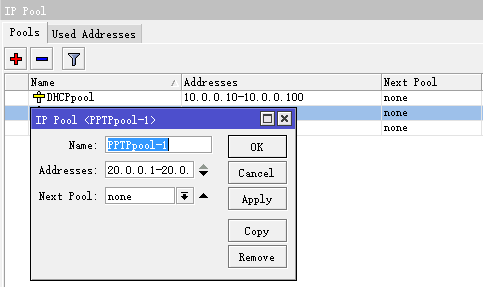
选择IP-》Pool点击+号新建pool,然后输入池名称pool_pptp,地址输入10.0.0.1-10.0.0.100,新的池输入none(默认),最后点击“OK”。
/ ip pool add name="PPTPpool-1" ranges=20.0.0.1-20.0.0.10
2.激活PPTP Server
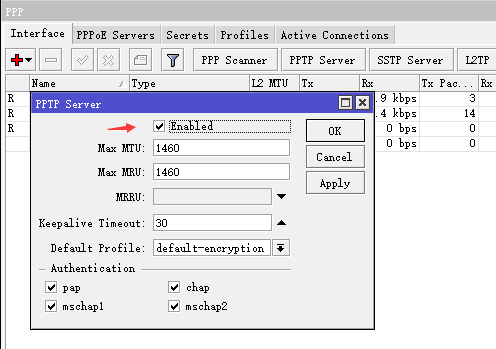
点击PPP-》Interface-》PPTP Server,勾取上enable,Max MTU和Max MRU都改成1460,其余设置参考下图,完成后点击“OK”。
/interface pptp-server server
set authentication=mschap1,mschap2 default-profile=default-encryption \
enabled=yes keepalive-timeout=30 max-mru=1460 max-mtu=1460
3.配置Profile即PPTP配置文件
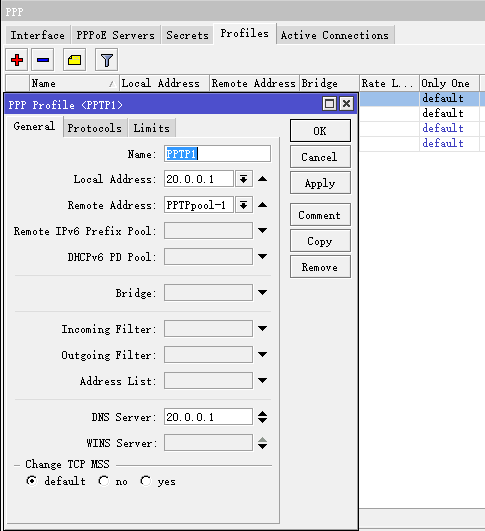
Local Address:配置外网IP或者V P N的虚拟IP都行,这里配置V P N虚拟机IP
Remote Address:选择前面创建的IP地址池
DNS Server:根据实际情况配置,或者直接配置当地运营商的DNS
/ ppp profile add change-tcp-mss=no dns-server=20.0.0.1 \
local-address=20.0.0.1 name=PPTP1 only-one=yes \
remote-address=PPTPpool-1 use-encryption=yes
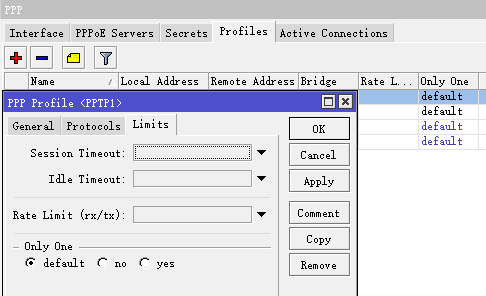
 Limits选项卡可以配置限制上传下载速度以及是否允许V P N帐号重复拨号
4.创建PPTP V P N用户
Service:选择pptp
Profile:选择前面创建的Profile
Remote Address:用来指定该账户拨号后获取的固定IP
/ppp secret add name=001 password=001 service=pptp profile=PPTP1
 5.添加PPTP Server
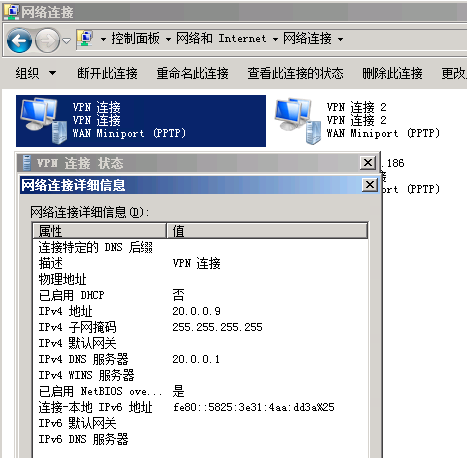
 6.配置完成客户端就可以进行拨入了
7.拨入不能上网的话需要添加NAT
选择IP-》firewall-》nat添加新策略
在新NAT Rule中选择Chain为srcnat,配置源地址和目的地址后,Action选择masquerade自动翻转。
V P N的虚拟网段20.0.0.0/24 到办公内网网段10.0.0.0/24